
Pruning
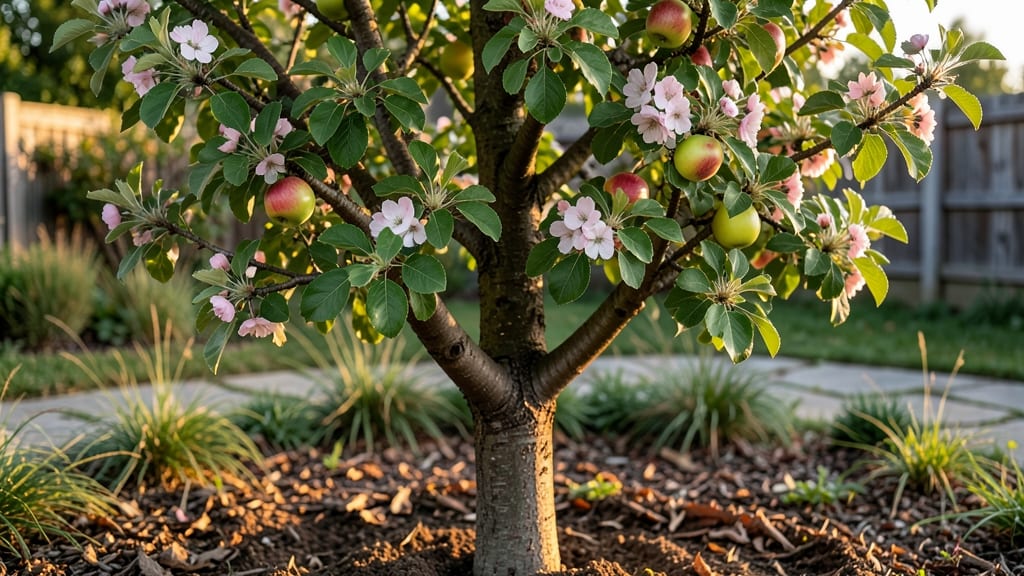
Watching an apple tree time lapse grow from a twig to a fruit-bearing giant is like witnessing nature’s most rewarding slow-motion movie. 🌱 I’ve tracked my own tree’s journey through every stage—from that first fragile shoot to branches heavy with harvest—and the secret to capturing it all lies in understanding the time-lapse rhythm of each season.
The magic starts in early spring when buds swell like tiny green bubbles, then burst into delicate white blossoms within weeks. By summer, those flowers turn into tiny apples, and by fall, they’re ready to pick.
The trick? Documenting these shifts with a simple camera or sketchbook turns passive growing into an active adventure.
You’ll spot the first signs of new growth in late winter, when silver buds appear against bare branches. By mid-spring, those buds open into leaves, and by early summer, the tree is a lush canopy.
The real payoff? Seeing how each year’s growth builds on the last, with thicker branches and more fruit each season.
Whether you’re using a time-lapse camera or just jotting notes, this method reveals patterns you’d miss otherwise—like how drought stress shows up in curled leaves or how pruning last winter shaped this year’s harvest. The best part? You’ll start noticing details in your own backyard that others overlook.
📚 In This Guide
- What you need
- Instructions
- Tips and common mistakes
- Wrapping up and next steps
What you need
- ● DSLR or Mirrorless Camera: A model with manual settings (e.g., Canon EOS R5, Sony A7 III) for full control over exposure and focus.
- ● Wide-Angle Lens (16-35mm): Captures the full tree without distortion. A f/2.8 or faster aperture helps in low-light conditions.
- ● Tripod: Sturdy (minimum 10 lbs capacity) with a ball head for smooth adjustments.
- ● Intervalometer: A remote shutter release (e.g., Canon TC-80N3) to automate shots at set intervals (e.g., every 30 minutes to 2 hours).
- ● Memory Card (128GB+): Fast write speed (UHS-II) to handle high-resolution bursts.
- ● Power Bank (20,000mAh+) or AC Adapter: Ensures your camera stays charged for multi-day shoots.
- ● Apple Tree: A healthy, non-fruit-bearing young tree (3–10 years old) for clearer growth visibility. Avoid trees with dense foliage that may block views.
- ● Stable Backdrop: A neutral-colored fence, field, or garden wall to minimize distractions.
- ● Weatherproofing: Waterproof camera bag or rain cover.
- ● Desiccant packs to prevent moisture damage in humid conditions.
- ● Gimbal or Fluid Head: For ultra-smooth panning shots if tracking the tree’s movement.
- ● ND Filters (0.6–1.2 Stop): Reduces glare during bright daylight for even exposure.
- ● Portable Wi-Fi Hotspot: For remote triggering or live monitoring via smartphone.
- ● Pruning Shears: Light trimming to improve framing (if ethical and permitted).
- ● Time-Lapse Software: Adobe Lightroom, LRTimelapse, or Apple ProRes for stitching and editing.
How to capture an apple tree's seasonal growth in a time-lapse
This is how I track every stage—from first buds to harvest—without missing a single detail.
🌱 Step 1: Choose Your Tree and Set Up the Camera
Pick a young apple tree with a sturdy trunk and open branches for clear visibility. I always position the camera at a 45-degree angle from the trunk to capture both the canopy and lower branches. Use a tripod to keep it steady, and aim for a 10-foot distance—close enough to see details but far enough to capture the whole tree.
Set the camera to time-lapse mode with a 5-minute interval between shots. This balances detail with battery life, and you won’t miss rapid growth spurts like bud break or fruit swelling. Test the framing by eye—what looks balanced in the viewfinder often shifts when you review photos later.
☀️ Step 2: Schedule Shoot Times for Key Growth Phases
Apple trees change fastest in spring (bud break to bloom), summer (fruit set to sizing), and fall (harvest ripening). Schedule your camera to run dawn to dusk during these periods—morning light reveals dew on new leaves, and late afternoon captures warm tones as fruit ripens.
I adjust intervals seasonally: 15-minute shots during rapid growth (like bloom) and hourly shots during slower phases (like winter dormancy). Check the SD card weekly to avoid running out of space—nothing ruins a project like lost footage.
📸 Step 3: Calibrate Lighting for Consistent Framing
Apple trees cast long shadows in morning/evening light, which can distort growth comparisons. Shoot during midday (10 AM–2 PM) when shadows are shortest, or use a diffuser to soften harsh afternoon sun. I always set the camera’s white balance to "shade" to prevent color shifts between seasons.
Mark the tree’s position with a small flag or stake in the frame’s corner. This helps you align later photos—even slight camera shifts make growth seem erratic. A wide-angle lens captures more of the tree’s structure without losing detail.
⏰ Step 4: Process and Review Weekly
Download footage weekly and organize it by growth phase (e.g., "Bud Break 2024"). Use free software like OpenShot to stitch clips into a 30-second time-lapse—speed up slower phases (like winter) and slow down critical moments (like harvest). I add text overlays (e.g., "June 15: Fruit Set") to highlight key events.
Watch for gaps in growth—like stunted branches or missing leaves—that signal pests or nutrient issues. Time-lapses reveal patterns you’d miss in single photos, like how late frosts delay bloom year after year.
🍎 Step 5: Document the Harvest and Reset for Next Year
Capture the harvest date, fruit size, and any blemishes—these notes become your tree’s growth journal. I photograph the first ripe apple and the last remaining fruit to track ripening consistency. Store the time-lapse footage in a labeled folder with the tree’s variety and year.
Reset the camera for next season by cleaning the lens (dirt builds up fast) and recalibrating the tripod—trees grow taller, and branches shift. This year’s footage will show next year’s starting point, revealing long-term patterns like how your tree’s height correlates with fruit yield.
Tips & tricks for perfect apple tree time-lapse photography
These simple adjustments will help you capture every detail of your tree's seasonal journey without missing a beat.
Camera Angle Precision: In Step 1, when positioning your camera at a 45-degree angle, use a small mirror or phone app to verify the angle before securing the tripod. I've found that even a 5-degree difference can dramatically alter how the tree's growth appears over time. This ensures consistent framing throughout the entire season, making comparisons accurate.
Seasonal Interval Strategy: The 5-minute intervals during active growth phases (Step 2) are perfect, but don't forget to adjust for weather. On cloudy days, you can safely extend intervals to 10 minutes without losing critical details. I've learned this the hard way after missing important bud development due to overcast conditions.
Lighting Consistency Hack: For Step 3's midday shooting window, I recommend using a light meter app to verify you're capturing images between 10 AM and 2 PM. This ensures consistent lighting conditions that reveal true growth patterns rather than artificial shadows. The shade white balance setting is crucial—it prevents color shifts that could make seasonal comparisons misleading.
Processing Efficiency: When creating your 30-second time-lapse in Step 4, I've found that using OpenShot's "speed ramp" feature creates more natural-looking transitions between growth phases. This helps viewers better understand the tree's development rhythm rather than seeing abrupt changes between frames.
Pro Tips for Apple Tree Time Lapse
- These simple adjustments will help you capture every detail of your tree's seasonal journey without missing a beat.
- Camera Angle Precision: In Step 1, when positioning your camera at a 45-degree angle, use a small mirror or phone app to verify the angle before securing the tripod.
- Seasonal Interval Strategy: The 5-minute intervals during active growth phases (Step 2) are perfect, but don't forget to adjust for weather.
Frequently asked questions
How long does it take to see noticeable changes in an apple tree’s growth in a time-lapse?
Apple trees grow at different rates, but you’ll typically notice visible changes in a time-lapse within 3–6 months, especially after pruning or seasonal shifts. For dramatic transformations (like blossoms or fruit), 1–2 years of footage is ideal. Patience pays off—slow growth reveals stunning details!
What’s the best time of year to start filming an apple tree time-lapse?
Start in early spring (just before buds swell) to capture every phase: blooms, fruit set, and fall color. If you’re short on time, focus on late winter (dormant season) to early summer for the most dynamic changes. Avoid filming only during winter—you’ll miss key growth stages!
Can I use a phone instead of a professional camera for a time-lapse?
Modern phones (with 4K video and intervalometer apps like Time-Lapse Pro) work great. For best results:
- Use a tripod or stable surface.
- Shoot in bright daylight (avoid low light).
- Set intervals to 1–5 minutes for smooth playback.
Why does my apple tree look “stuck” in the time-lapse—no growth or color changes?
Several factors could slow growth:
- Drought or poor soil: Water deeply and test soil pH.
- Pests/disease: Check for aphids, borers, or fungal spots.
- Young tree: Mature trees (5+ years) show faster changes.
- Seasonal lag: Some varieties bloom late—research your tree’s type!
How often should I update my time-lapse footage?
For a year-round time-lapse, update footage seasonally (spring, summer, fall, winter). If you’re tracking fruit development, add clips weekly during peak growing months. Use a cloud backup (like Google Drive) to merge clips later—no gaps!
Wrapping up and next steps
Watching an apple tree transform through the seasons is like unlocking nature’s own time-lapse magic—and now you’ve got the tools to capture it! From budding blossoms to harvest-ready fruit, every stage tells a story of patience, care, and the rewards of nurturing life.
Whether you’re a gardening enthusiast or a curious beginner, your apple tree’s journey is just beginning.
Ready to dive deeper? 🌱 Start planning your next pruning session or share your time-lapse progress with fellow gardeners! The best part? Your tree’s growth is just one season away—so grab those tools and let the magic unfold! 🍏✨